COLLABORATIVE PLATFORMS

Bring your community together in one place.

A platform to strengthen connections with your members, encourage participation and make it easier to share knowledge. With Surikai, you get a ready-to-use solution designed to evolve with your needs.

Illustration of a collaborative platform

USE CASES

What the platform supports

  • Training centres

    Extend learning beyond the sessions

    Keep learners and trainers in touch throughout a course and give former participants a place to stay connected. Share upcoming events and the training calendar.

  • Software vendors

    Organise peer support

    Let users answer each other’s questions and suggest improvements, alongside your documentation and support team.

  • Partners and clients

    Work together in private spaces

    Share information and documents, with access rights set for each group. Share updates and announce events.

  • Networks and associations

    Share members’ knowledge and experience

    Gather questions, resources and lessons learned in a space members can revisit and contribute to. Share updates and announce events.

IN PRACTICE

What the platform brings to the community

The platform gives members a shared space to exchange ideas, share knowledge and take part in community life. Everyone can contribute in the way that suits them, find useful information and participate in activities and decisions.

BUILD KNOWLEDGE

Knowledge that stays useful and keeps growing

An answer given today can still help members tomorrow. Discussions are organised by space and topic, a reply can be recognised as the solution, and search covers the community’s history. Members recognised for their expertise in specific areas can be identified and invited to contribute when a question matches their field.
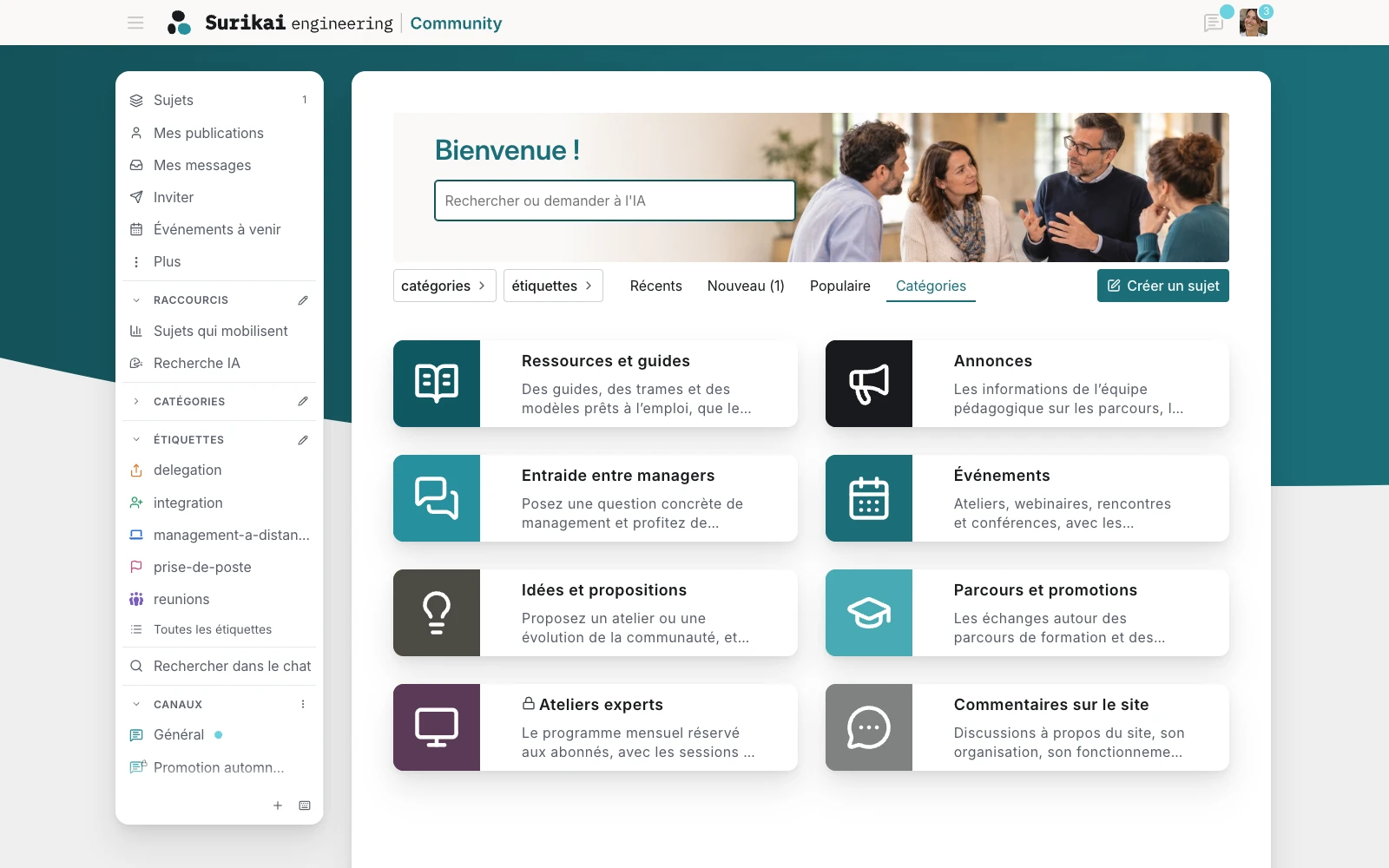
Surikai Community Categories page with sidebar navigation, shortcuts and categories displayed as cards.
Dedicated spaces to organise discussions, resources, events and proposals. (UI in French)Click to enlarge

Content worth keeping as a reference can be organised into guides, procedures, training material or product documentation. Authorised members can update and expand it together while keeping the discussions that help refine it.

With the AI built into the platform or, if they choose to, by connecting a personal AI assistant such as Claude or ChatGPT, members can query the community’s knowledge in natural language, summarise a long discussion, prepare a reply and, according to their permissions, publish directly in the platform.
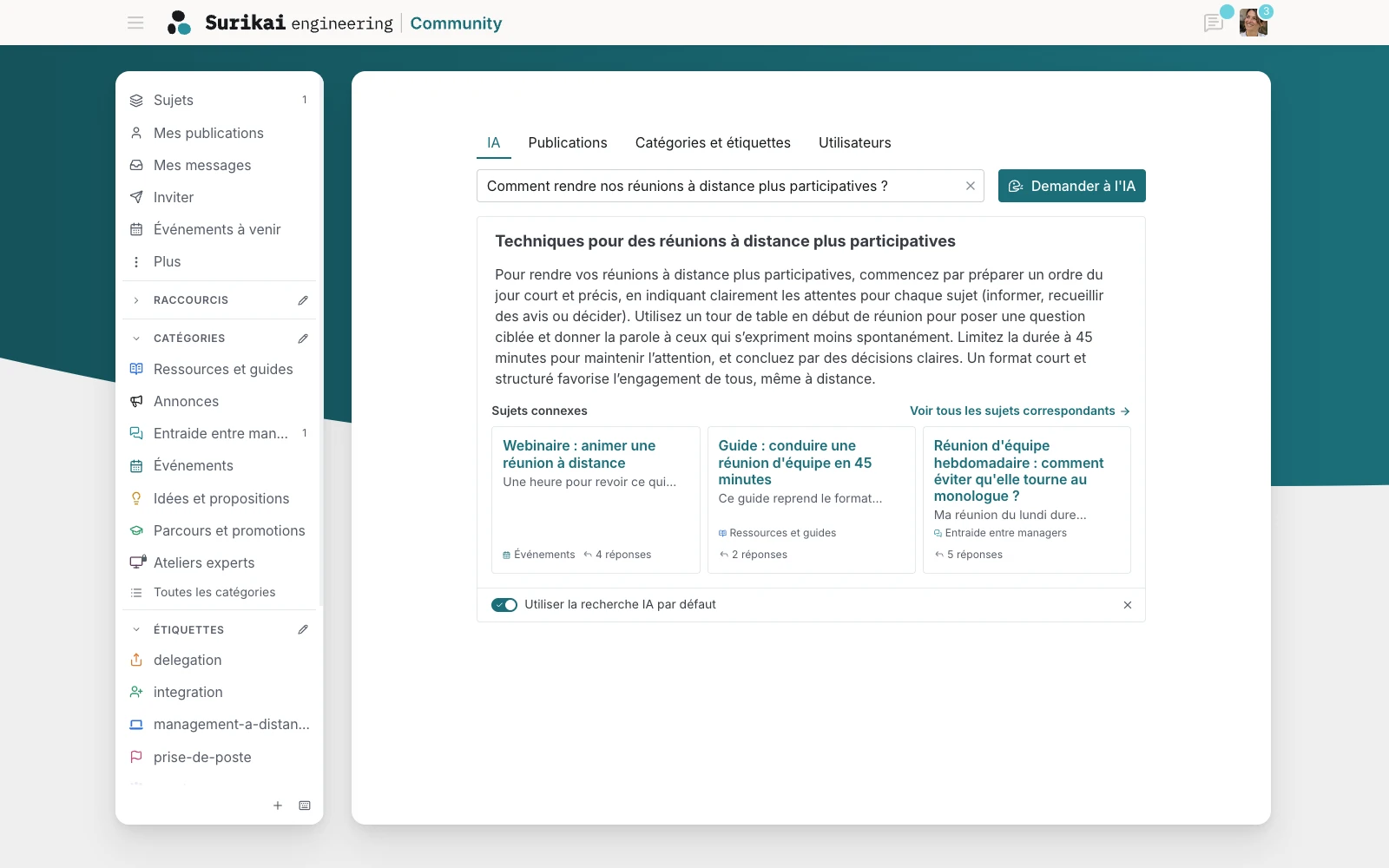
AI search results about running meetings, with a summary and links to discussions and resources.
Find an answer from the discussions and resources already available across the community. (UI in French)Click to enlarge

TAKE PART

Take part in the way that suits you

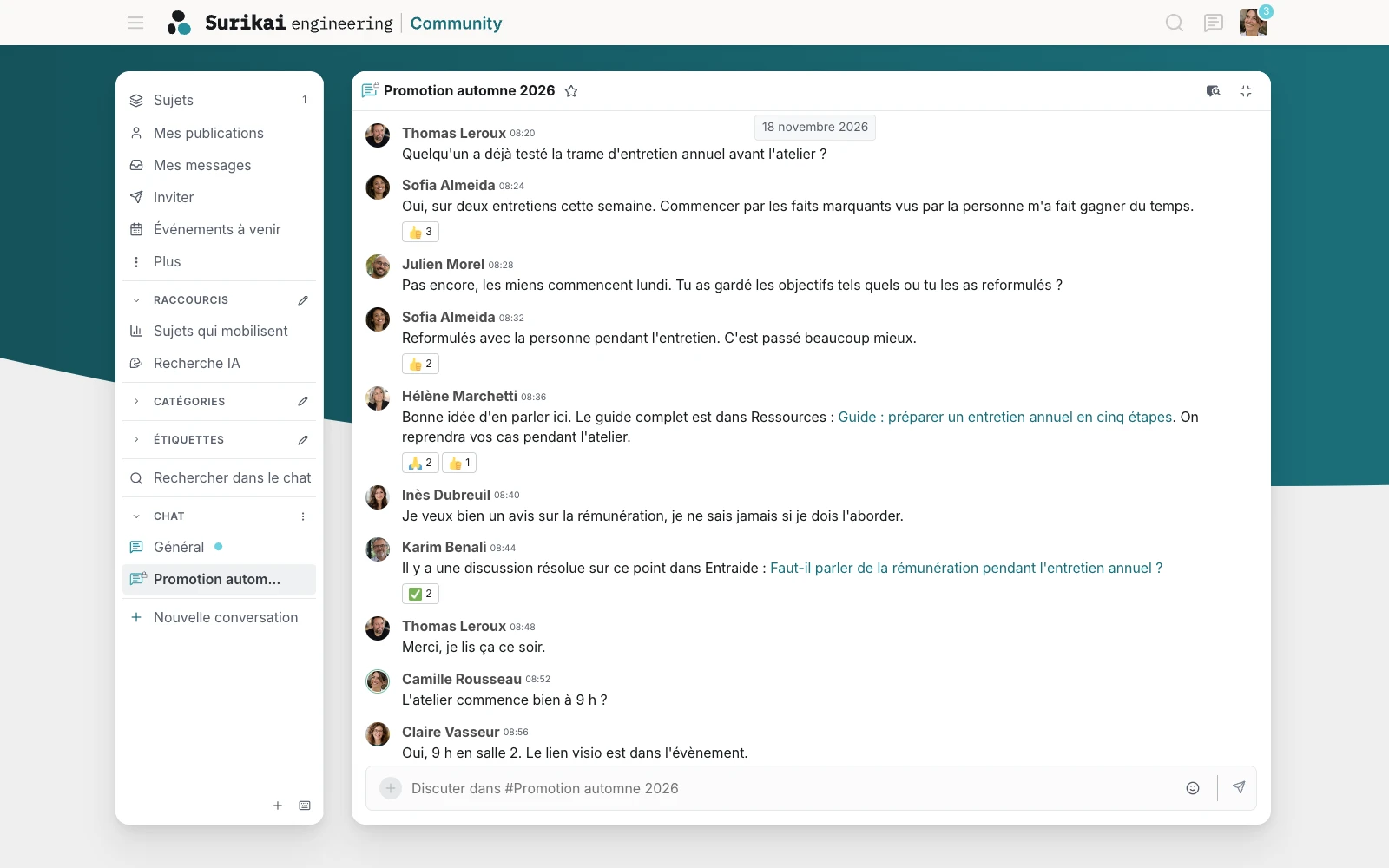
Members can follow discussions from a computer or phone and use chat for more immediate exchanges. Depending on the multilingual setup, content can also be translated so that people can read and contribute in a language they are comfortable with. The same topics, answers and resources remain shared within one community.

Email notifications highlight activity that concerns them: a reply to a discussion they created or follow, a chat message or another important exchange. They stay informed without needing to remain connected to the platform. For discussions, they can also reply directly from their inbox; their response is then added to the corresponding thread.

Group conversation in Surikai Community with reactions and links to resources.
Immediate conversations for exchanges that do not need a structured discussion of their own. (UI in French)Click to enlarge

INVOLVE

Involve members in decisions

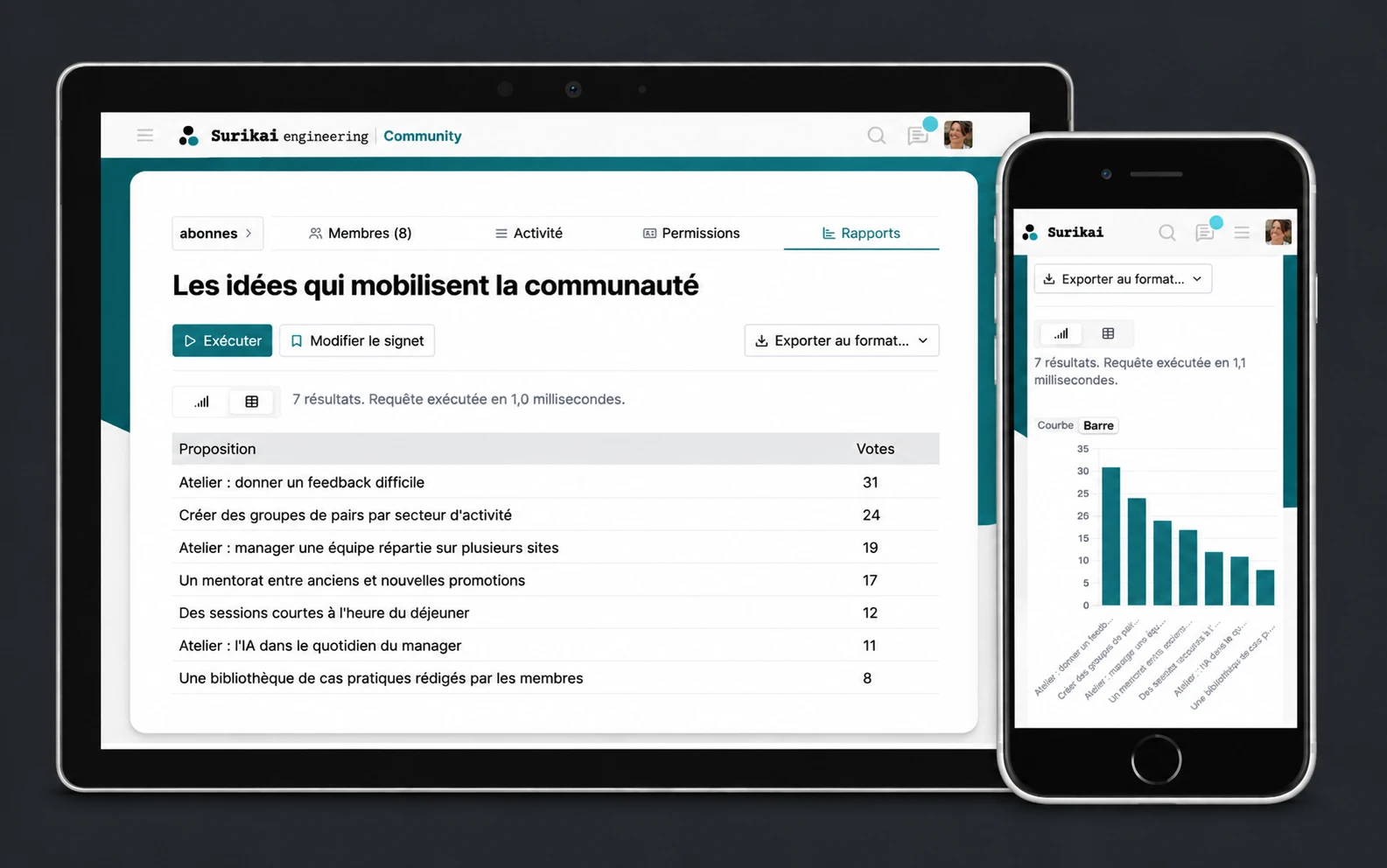
A poll can take the pulse of the community, compare several options or rank preferences. For subjects that benefit from further discussion, members can submit ideas, discuss them and then support them with votes.

This gives the organisation structured input when choosing upcoming workshops, prioritising product improvements or deciding between competing projects.

Community proposals ranked by vote count, displayed as a table and a chart.
Turn member proposals and votes into shared priorities. (UI in French)Click to enlarge

BRING TOGETHER

Organise community events

Events, meetings and training sessions come together in a shared calendar. Members can see what is coming up, indicate whether they will attend and receive reminders.

Conversations linked to an event remain accessible in the same place, making it easier to share useful information beforehand and continue the discussion afterwards.

STAY IN CONTROL

Control access and moderate discussions

A single platform can host spaces open to everyone alongside areas reserved for particular members, learner cohorts, partners or clients. Access rights determine what each group can see and what they can do.

The team running the community has the tools to manage members, review reports, approve selected contributions and assign moderation rights.

AUTOMATE

Automate how the community operates

Actions can be triggered automatically by an event, a condition or a deadline. The platform can, for example, guide a new member through onboarding, route a question to the relevant experts, follow up on an unanswered request or send reminders for an upcoming event.

These automations reduce repetitive work and make it possible to adapt the way the community operates to the organisation’s processes.

FUND

Help fund the community

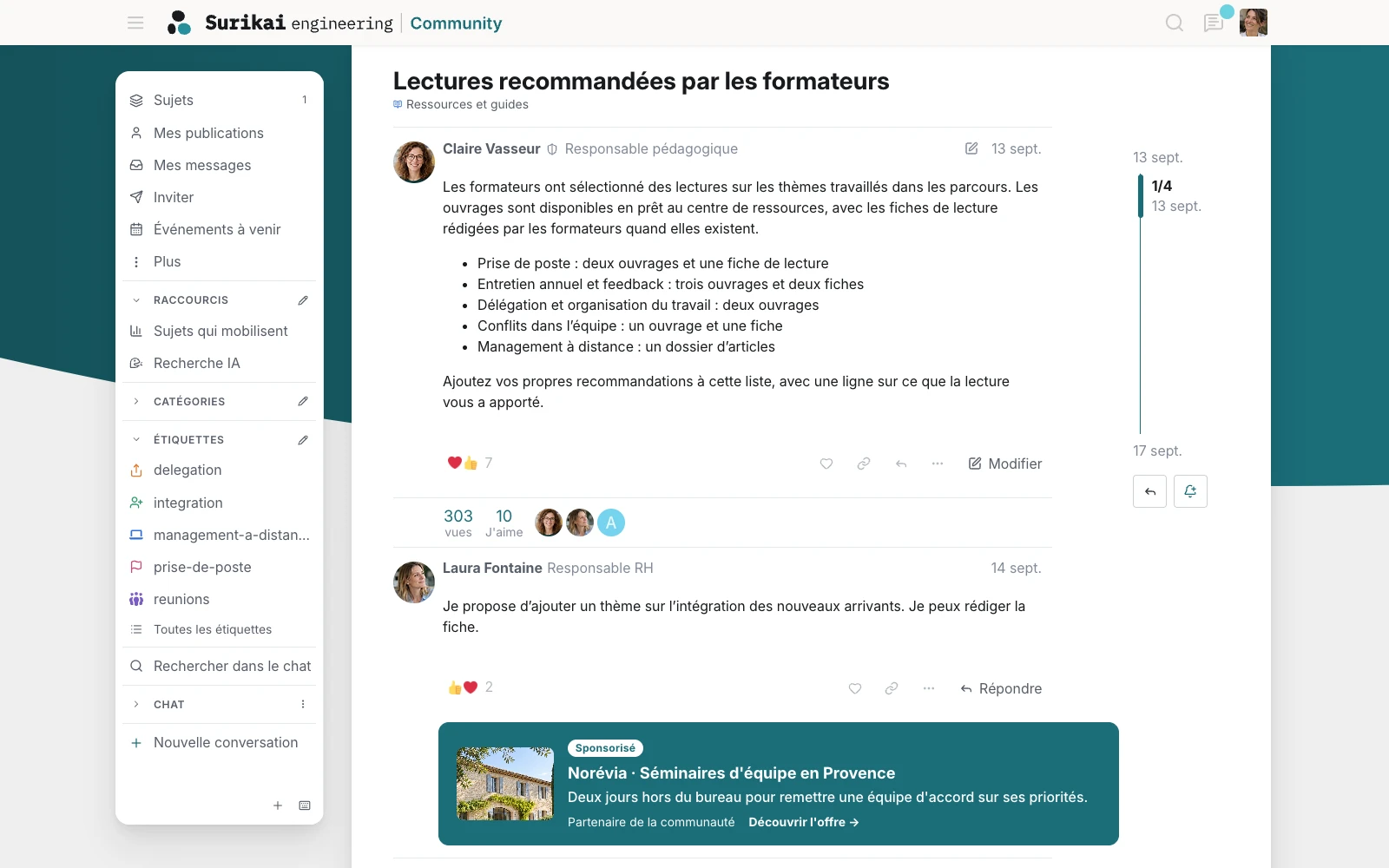
The platform can include placements for partners or advertisers selected by the organisation and clearly identified as sponsored.

Selected spaces or resources can also be offered through paid access, either as a one-off purchase or a subscription. The corresponding access rights can be granted automatically after payment.

Surikai Community discussion with a partner placement clearly marked as sponsored.
Clearly identified sponsored partnerships can help fund the community. (UI in French)Click to enlarge

SHARED RESPONSIBILITIES

What we take care of

We configure the platform around your visual identity and organisation: spaces, groups, access rights and registration methods. Personal data management and GDPR-related requirements are also taken into account from the configuration stage.

We then handle hosting in Europe and ongoing operations:

  • Security and version updates
  • Verified backups and recovery procedures
  • Monitoring and alerts
  • Support for community administrators

Your team runs the community and moderates discussions. We help administrators get comfortable with the administration and moderation tools.

PLANS

Two plans, with custom adaptations available

Both plans include the initial setup, hosting and ongoing operation of the platform. The quote sets out the setup fee, subscription and any adaptations separately.

  • Launch

    A platform based on our standard setup, organised into spaces and groups, with branding in your organisation’s colours.

  • Grow

    Launch, plus more detailed configuration, standard automations and activity reporting. A quarterly review helps adjust the platform to how the community uses it.

  • Custom

    Custom development can extend either plan with access management, connections to your existing tools, automations or features tailored to your needs. The work is quoted separately; maintenance may be covered by an additional fixed fee.

SEE A REAL-WORLD EXAMPLE

The Career & Mobility Hub shows how the platform can be extended with member profiles, subscriptions and natural-language search.

The Hub project

FAQ

Setup and ongoing use

Who manages and moderates the community?

Your team handles day-to-day community management and moderation. We help them use the administration and moderation tools and remain available for technical questions.

Why not use a social media group or a messaging app?

Social media and messaging apps make quick exchanges easy. A dedicated platform lets you organise discussions, keep resources accessible over time and set your organisation’s access rules and branding.

Can the platform be private?

Yes. It can be fully private, open to the public or a mix of both, with spaces reserved for specific groups. Registration can be open or subject to approval. A separately quoted adaptation can link it to your membership records.

Can discussions from an existing forum or group be migrated?

This depends on the source tool, its export options and the volume of content. We assess what can be migrated and quote for the work before any commitment.

What happens to our data if we stop?

Content and member accounts can be exported, and the community moved to another host. The terms of the export and transfer are set out in the quote.

Where is the platform hosted?

In Europe by default, on infrastructure we operate. A dedicated deployment can use another provider, including AWS, Microsoft Azure or Google Cloud.

What technology is the platform built on?

Discourse, an open-source platform for discussions and online communities. We build components for the platform and have contributed fixes adopted by its development team. The Discourse Engineering page describes our technical services, including work on existing instances.

Discourse Engineering

Let’s discuss your project

Launching or reorganising a community

We discuss how the community will use the platform, its approximate size and the tools already in place. This helps identify a suitable plan and any development work to consider.

Discuss your project